

Table of Contents
If you have a valid VAT number, you can add it during checkout to ensure VAT is handled correctly according to your business or tax requirements.
Depending on the checkout method being displayed, the VAT number can be entered in one of two places:
Option 1: Add VAT Number in the Checkout Form #
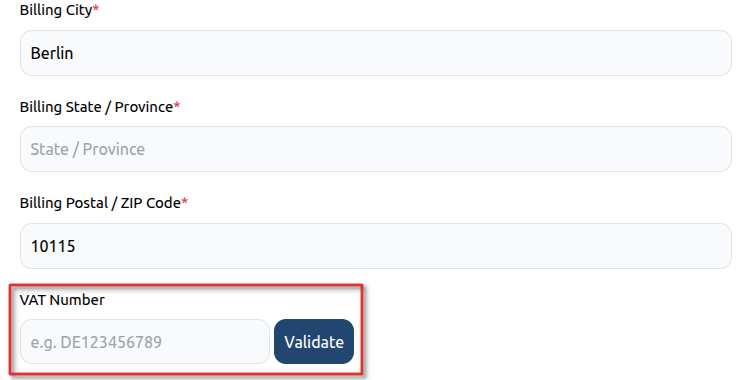
Some checkout pages display a dedicated VAT Number field within the billing details section.
Steps #
- Complete your billing information.
- Enter your VAT number in the VAT Number field.
- Click the Validate button.
- Wait for the VAT number to be verified.
- Complete the checkout process.
Important Notes #
- Make sure the billing country matches the country associated with your VAT registration.
- Enter the VAT number in the correct format for your country.
- The VAT number must be validated successfully before checkout is completed.
Option 2: Add VAT Number in the Paddle Payment Window #
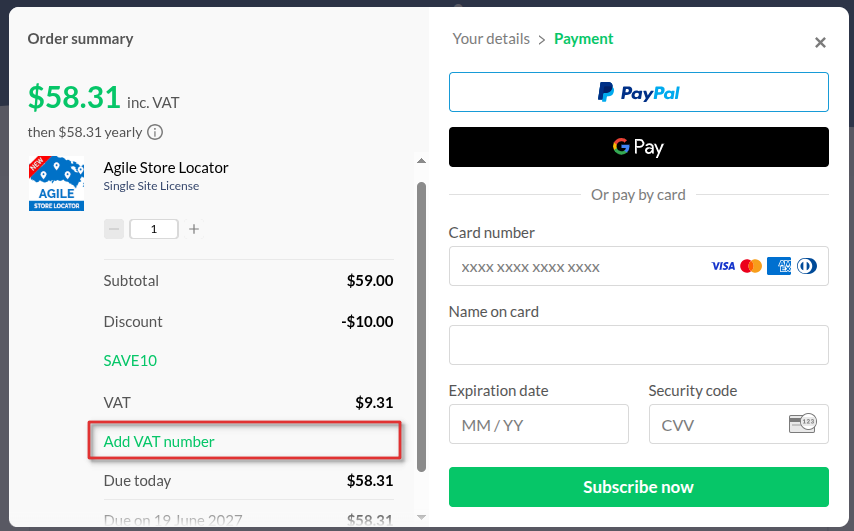
If the VAT field is not shown on the checkout form, you can add it directly within the Paddle payment pop-up.
Steps #
- Proceed to checkout and open the Paddle payment window.
- In the Order Summary section, click Add VAT number.
- Enter your VAT number when prompted.
- Allow Paddle to validate the VAT number.
- Once validated, continue with the payment process.
Troubleshooting VAT Validation #
If your VAT number is not accepted:
- Verify that the VAT number is active and valid.
- Ensure the billing country matches your VAT registration country.
- Remove spaces or special characters if validation fails.
- Double-check that the VAT number has been entered in the correct format.
Example #
For Germany:
DE123456789Need Help? #
If you continue to experience VAT-related issues during checkout, please contact [email protected] and provide:
- Your VAT number (if applicable)
- Billing country
- A screenshot of the error message
- The product you are attempting to purchase
Our team will review the issue and assist you with completing your purchase.


