
Best Multi Store Plugin to Set Up Local Pickup in WooCommerce Store
Elevate your customers' shopping experience with Multi-Store Addons for WooCommerce, which introduces a seamless local pickup store selection process for customers at the checkout page.
Advanced Local Pickup Features in WooCommerce Specifically Designed for Your Ecommerce Needs
Explore the features that will improve your local pickup offering capabilities and make setting up local pickup shipping a smooth experience

Add Multiple Pickup Points
Use the advanced local pickup feature to set up multiple pickup points that your customers can choose by using the interactive map.

Store Selection By Map
The advanced local pickup shipping method features an interactive map that your customers can use to easily select the pickup point.

Easily Assign Stores
Create local pickup shipping zones, and then easily assign relevant stores to the local pickup zone with the press of a button.

Order Preparation Time
Make sure you have enough time to prepare or retrieve a customer's order by using the Cutoff Time feature to schedule customer pickup dates and times.

Email Notifications
Whenever an order is placed, both you and your customer will get an email notification about the order details to ensure everyone is on the same page.

Two Store Selection Methods
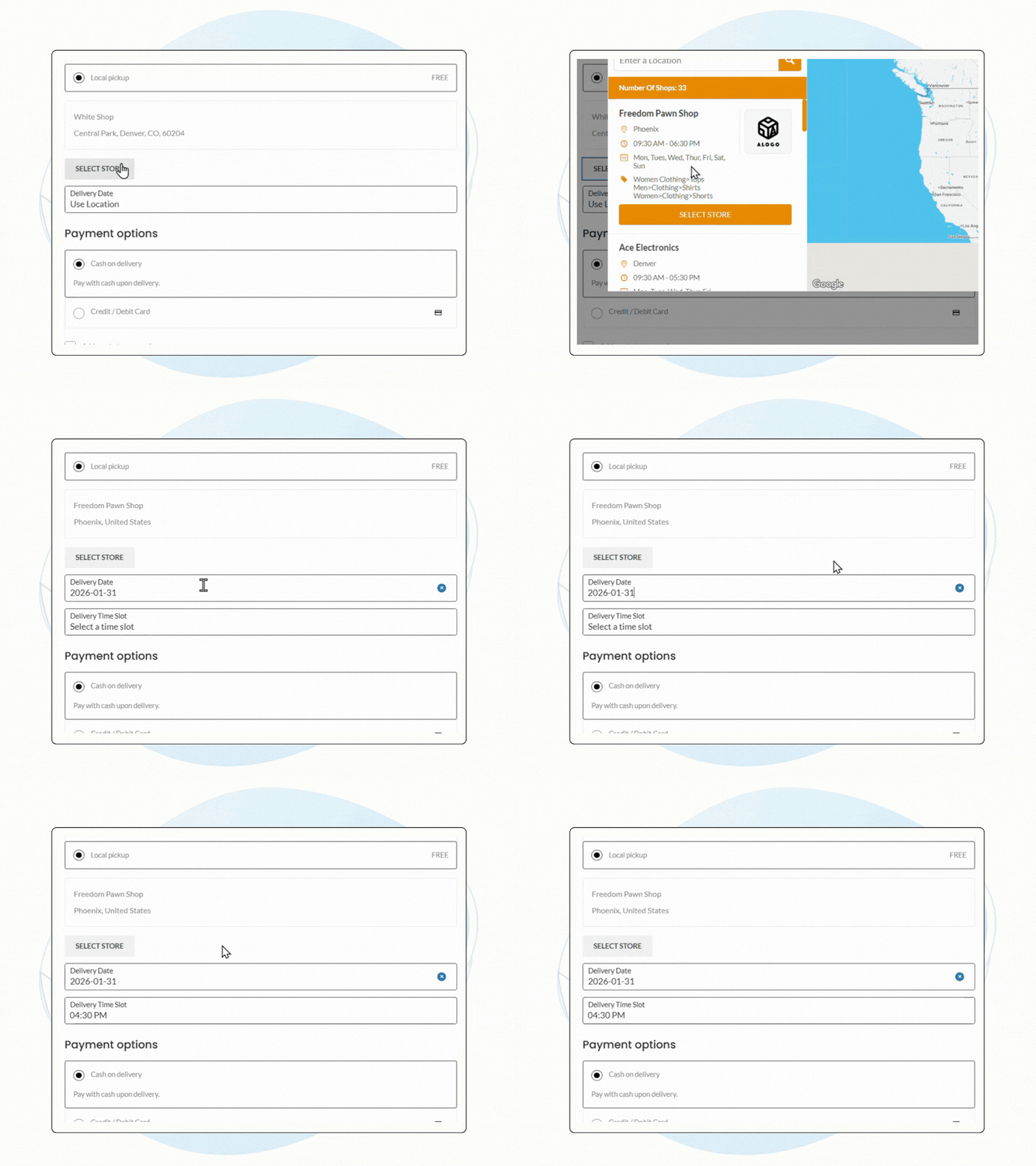
Your customers can select a location for local pickup by picking a store from the store map or by selecting a store using the store list.

LOCAL PICKUP POINTS
Set Up Multiple Local Pickup Locations With Ease
You can create multiple local pickup points to give customers convenient order collection options.
Pickup points are managed by linking stores to shipping zones, keeping setup simple and scalable.
- Add unlimited pickup points to your store map
- Link pickup points to stores easily
- Update pickup locations with minimal effort
- Expand pickup coverage across locations
More pickup points mean greater customer convenience.
Flexible pickup options improve accessibility and satisfaction.

LOCAL PICKUP ZONES
Create Dedicated Shipping Zones for Local Pickup
WooCommerce shipping zones can be created specifically for local pickup areas.
This ensures customers only see pickup locations relevant to their location.
- Create pickup-only shipping zones
- Assign stores or pickup points per zone
- Match pickup options to customer location
- Simplify delivery and collection workflows
Zone-based pickup keeps collection accurate and efficient.
Dedicated pickup zones make local fulfillment effortless.
Watch Setup Guide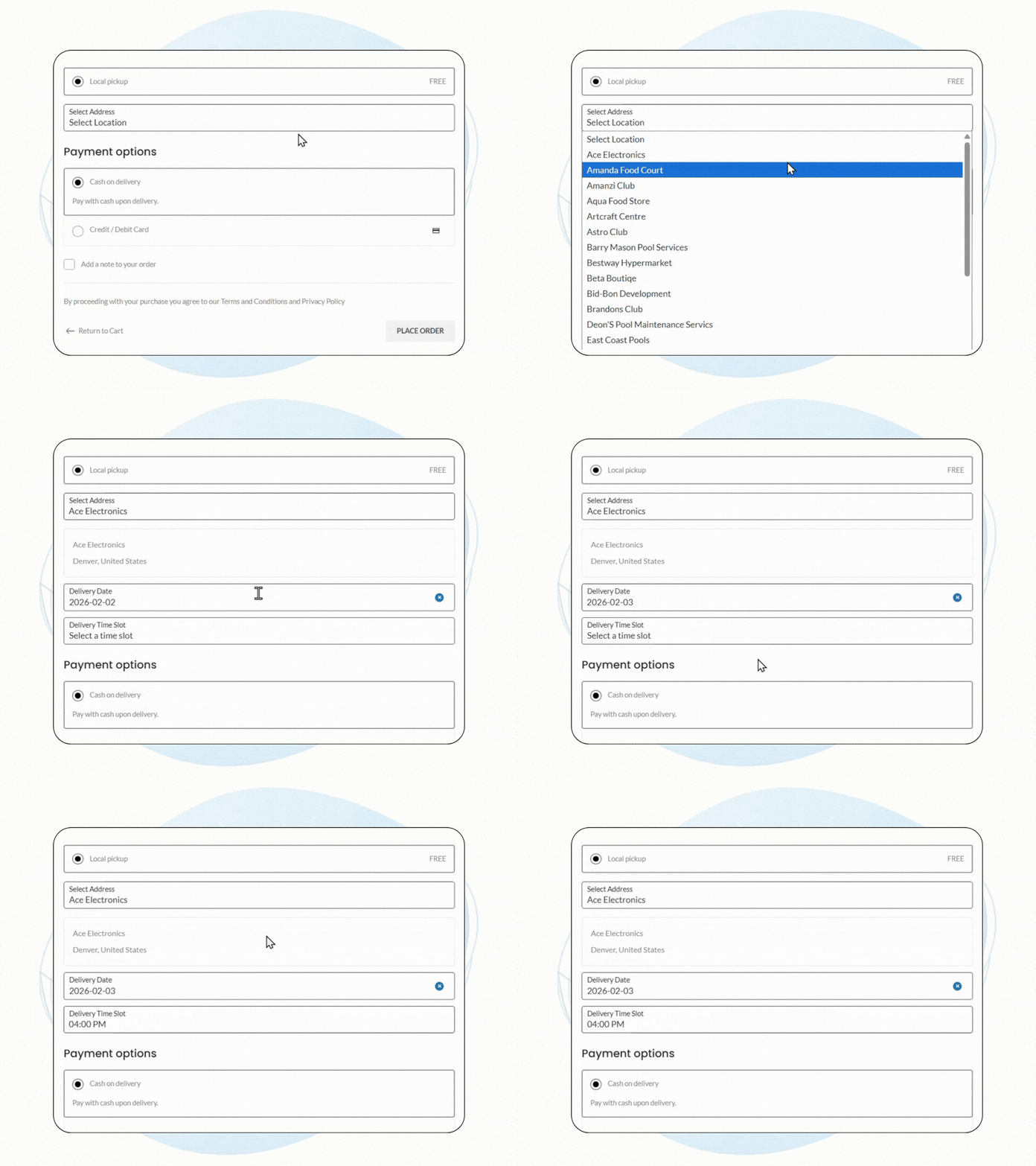
PICKUP SCHEDULE
Let Customers Choose Pickup Date and Time
Customers can select their preferred pickup date and time during checkout when choosing local pickup.
Cutoff times ensure your team has enough preparation time before collection.
- Allow customers to select pickup date and time
- Set cutoff times for order preparation
- Share pickup schedule details automatically
- Know exactly when customers will arrive
Scheduled pickups create clarity for everyone involved.
Pickup scheduling keeps collections organized and predictable.
Read Guide
PICKUP NOTIFICATIONS
Automatic Email Notifications for Pickup Orders
Automatic emails are sent to customers and pickup locations once a pickup point is selected.
This keeps everyone informed about pickup details and reduces confusion.
- Send pickup confirmation emails to customers
- Notify pickup locations about incoming orders
- Share pickup date and time automatically
- Keep all parties informed and prepared
Clear communication prevents missed or delayed pickups.
Timely notifications make local pickup smooth and reliable.
PICKUP SELECTION
Two Simple Ways to Choose a Pickup Location
Customers can choose pickup points from a store list or an interactive map.
Both options are available directly from the cart for a seamless experience.
- Select pickup points from a store list
- Choose locations using an interactive map
- Enable local pickup directly from the cart
- Offer a clear and user-friendly flow
Flexible selection improves convenience and usability.
Simple pickup selection leads to faster, happier checkouts.
WHAT DO YOU GET
Use the Advanced Local Pickup to Gain Several Benefits

Avoid Challenges Associated with Delivering Products to Customers
By eliminating the need to deliver products to customers, you will be saving yourself from countless logistic challenges that can negatively affect your business operations and your bottom line.
- No need to worry about making late deliveries
- No need to carry out route optimizations
- Avoid delivering to the wrong addresses
- No need to track the shipment when it's en route

Use the Advanced Local Pickup Feature to Save Tons of Money
By using the local pickup feature in Multi Store Addons for WooCommerce plugin, you can potentially save a lot of money that would have otherwise been used to cover various delivery costs.
- No Fuel Charges
- No Need To Hire More Employees
- Save Traffic Tariffs
- No Need to Buy Delivery Vehicles

Attract People Who Prefer To Collect Purchased Products
Some people may not want to pay high delivery fees to get their desired products nor are they willing to wait long delivery times; local pickup allows these people to speed up the collection process.
- Gain the customer base that prefers to use local pickup
- Customers will appreciate having multiple delivery options
- People who do not want to pay delivery fees to buy online
- Add another revenue stream to your business through local pickup
Frequently Asked Questions
The Multi Store Addons bundle includes the following modules and more:

Local Pickup
Table Rate
Shipping

Distance Rate
Shipping

Store Selection
Widget

Email Notification

Location Picker
The Local Pickup feature in Multi Store Addons for WooCommerce allows customers to choose a preferred pickup location from multiple options, making it convenient for them to collect their purchases directly from the store.
You can set multiple pickup points by creating additional store locations and then assigning these store locations to shipping zones that use the local pickup shipping method. This is done through the “Local Pickup” tab in the Multi Store Addons for WooCommerce plugin.
Yes, you can create shipping zones specifically for local pickup. This helps in optimizing delivery and collection processes based on different geographic areas.
The order management feature includes functionalities such as order preparation time (Cutoff Time) and email notifications for both customers and pickup locations, ensuring efficient handling of local pickup orders.
The local pickup option helps avoid logistical challenges and saves on delivery costs. It is also appealing to customers who prefer to collect their purchases themselves.
Yes, the plugin provides links to setup guides, FAQs, support, and purchasing options to help you configure and manage local pickup efficiently.
Yes, customers can view the distance from their address to the selected pickup location, thanks to the proximity indicator feature in the plugin.
By offering a convenient and cost-effective pickup option, the local pickup feature enhances customer satisfaction and can potentially increase store traffic and sales.
Local Pickup Screenshots

Screenshot showcasing the backend options for local pickup settings, which users can customize according to their preferences and needs.

Screenshot showcasing the backend options for local pickup shipping methods, which users can customize according to their preferences and needs.

Screenshot displaying the local pickup store selection feature on the cart page.

Screenshot displaying the local pickup store selection feature using the store locator.

Screenshot displaying the local pickup store selection feature on the cart page.

Screenshot displaying the local pickup store selection feature using the drop-down menu.